Which ruby?
Playing around with Ruby, Rails, RefineryCMS...
anything installed?
~ $ which ruby
nope, ok...
~ $ sudo apt-get install ruby The following NEW packages will be installed: libreadline5 libruby1.8 ruby ruby1.8
hmm, ruby 1.8? let's try to get the current version, 1.9.2 just for grins...
~ $ sudo apt-get install ruby1.9.2-full
nothing. hmmm, refinerycms.com suggests we use rvm (whatever that is) and so do random interneteers linked to http://rvm.beginrescueend.com/rvm/install/ hmm, wants me to download and run a shell script i think
but we need curl to do that
~ $ sudo apt-get install curl
now we can view the install script and see exactly what it does ...
~ $ curl http://rvm.beginrescueend.com/releases/rvm-install-head
it also needs git, so make sure git installed, yep but if not, you have to apt-get install git-core (not "git" like you would think)
~ $ which git
now we can install rvm ... i think
~ $ bash < <( curl http://rvm.beginrescueend.com/releases/rvm-install-head )
make sure rvm installed correctly
~ $ type rvm | head -1
it's installed but it doesn't do anything
~ $ rvm
a bunch of text scrolled by really fast when it installed, better go back and read it...
ah, rvm post-install instructions tell us to close current shell and open a new one... and that we need to add something to our bash profile... and that we also need to install the following in order to install ruby... good grief...
~ $ sudo apt-get install build-essential bison openssl libreadline6 libreadline6-dev curl git-core zlib1g zlib1g-dev libssl-dev libyaml-dev libsqlite3-0 libsqlite3-dev sqlite3 libxml2-dev libxslt-dev autoconf libc6-dev
now we can install ruby version 1.9.2
~ $ rvm install 1.9.2
tell rvm to use the ruby we just installed
~ $ rvm use 1.9.2
check we are using the ruby version we just installed
~ $ ruby -v ~ $ which ruby
eh, make this version of ruby the default whenever we invoke ruby in a shell
~ $ rvm --default use 1.9.2
install rails!
~ $ gem install rails -v 3.0.4
here's where it gets confusing ;) not sure when to create the gemset
~ $ rvm gemset create refinery 'refinery' gemset created (/home/dv/.rvm/gems/ruby-1.9.2-p180@refinery).
~ $ cd dev ~/dev $ mkdir refinery-demo ~/dev $ cd refinery-demo/
create .rvmc file that refinerycms.com recommends
~/dev/refinery-demo $ echo 'rvm use --create ruby-1.9.2-p180@refinery' > .rvmrc
but now we have to install a gem ... maybe should have created that gemset after this command?
~/dev/refinery-demo $ gem install refinerycms 23 gems installed
hmm, ok, lets delete that gemset we created earlier...
~/dev/refinery-demo $ rvm gemset delete refinery
...and recreate it now that we installed the refinerycms gem
~/dev/refinery-demo $ rvm gemset create refinery
now generate our refinery rails demo app
~/dev/refinery-demo $ refinerycms rickrockstar Running: /home/dv/.rvm/rubies/ruby-1.9.2-p180/bin/ruby -S rails new "/home/dv/dev/refinery-demo/rickrockstar" --database sqlite3 --skip-test-unit --skip-prototype
Refinery successfully installed in '/home/dv/dev/refinery-demo/rickrockstar'!
Installing gem requirements using bundler.. ... Using rails (3.0.4) ... === ACTION REQUIRED === Now you can launch your webserver using:
cd /home/dv/dev/refinery-demo/rickrockstar rails server
ok, it says we're ready to rickroll! but what's this scary warning? "not yet trusted"?
~/dev/refinery-demo $ cd rickrockstar =============================================================== = NOTICE: = =============================================================== = RVM has encountered a not yet trusted .rvmrc file in the = = current working directory which may contain nasty code. = = = = Examine the contents of this file to be sure the contents = = are good before trusting it! = = = = Press 'q' to exit the reader when finished reading the file = ===============================================================
(press enter to continue when ready)
Examining /home/dv/dev/refinery-demo/.rvmrc complete.
================================================================ = Trusting an .rvmrc file means that whenever you cd into the = = directory RVM will execute this .rvmrc script in your shell = = = = Now that you have examined the contents of the file, do you = = wish to trust this .rvmrc from now on? =
(yes or no) > yes Using /home/dv/.rvm/gems/ruby-1.9.2-p180 with gemset refinery
now lets try to start up rails ... WTF, not installed?
~/dev/refinery-demo/rickrockstar $ rails server The program 'rails' is currently not installed. You can install it by typing: sudo apt-get install rails
double check some stuff...
~/dev/refinery-demo/rickrockstar $ which ruby ~/dev/refinery-demo/rickrockstar $ rvm info
ok, maybe this gemset stuff is confused? lets get out of this 'refinery' gemset somehow get rid of that .rvmrc file...
~/dev/refinery-demo $ mv .rvmrc dotrvmrc
delete the gemset...
~/dev/refinery-demo $ rvm gemset delete refinery
... and try rails again ... yes, it's there
~/dev/refinery-demo $ which rails /home/dv/.rvm/gems/ruby-1.9.2-p180/bin/rails
try to start up the server again... Success!
~/dev/refinery-demo $ cd rickrockstar/ ~/dev/refinery-demo $ rails server => Booting WEBrick
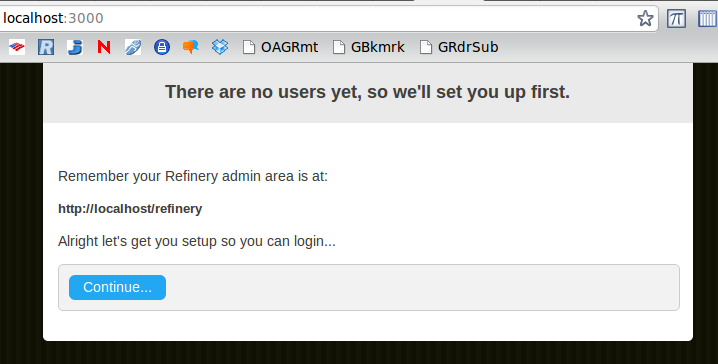
That was easy.